Substantive Post #3: Accessibility & Universal Design for Learning

Rethinking What Accessibility Really Means

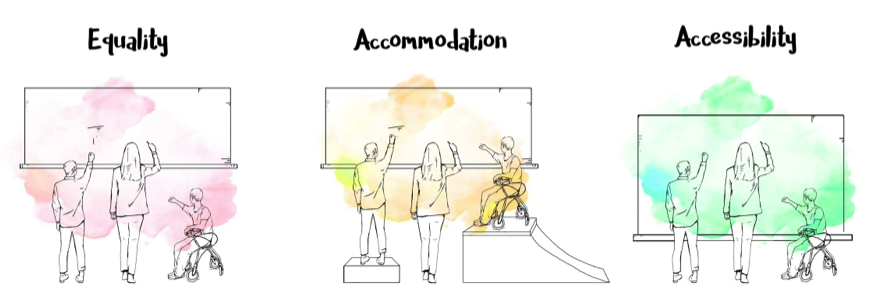
Accessibility in education is often framed as something we add after a problem shows up, an accommodation, a workaround, a special support for a few learners. Exploring and reflecting on Universal Design for Learning (UDL) and inclusive design has pushed me to rethink that idea entirely. Accessibility isn’t reactive, it’s intentional. It’s about designing learning experiences from the start with the understanding that learners are diverse in how they think, process, move and engage.

When barriers exist, they’re often not about a learner’s ability, but about a mismatch between people and the environments they’re expected to learn in. When those environments are designed more thoughtfully, many barriers fade away or never appear in the first place.

Accessibility as a Foundation for Inclusion

This way of thinking connects closely to the social model of disability and the core principles of UDL: multiple means of engagement, representation and expression. What feels most affirming about UDL is how familiar it is. The strategies UDL promotes (choice, flexibility, varied ways of showing understanding) are already hallmarks of good teaching.

For example, a TEDxTalk on the power of inclusive education illustrates how classrooms can be structured so that all learners actively participate, contribute and support one another’s thinking, modeling the kind of collaborative, student-centered engagement that active learning aims to promote. When students can access content in different ways and express their learning through multiple formats, participation increases across the board. Accessibility doesn’t single students out or label them as needing something “extra.” Instead, it creates learning conditions where more students can succeed without having to ask for special support.

Designing Accessible Multimedia

Accessibility becomes especially important when learning shifts into multimedia and interactive spaces. While multimedia can be engaging and powerful, it can also create barriers if meaning is locked into a single sensory channel. One key takeaway from the Accessible Multimedia reading was that accessibility isn’t about stripping media of creativity, it’s about expanding how meaning is communicated.

Captions, transcripts and audio descriptions are often thought of as niche supports, but they benefit far more learners than we tend to realize. English language learners, students processing dense information or anyone who prefers reading along while listening all benefit. Clear layout, thoughtful pacing and reduced cognitive load also make multimedia experiences more welcoming and easier to navigate.

Inclusive Design in Practice

Inclusive design asks us to design with difference as the norm, not the exception. There is no “average” learner and once that idea is let go, lesson planning starts to shift. Rather than asking who might struggle, I find myself asking how learning can offer multiple entry points from the beginning.

This shift feels both challenging and reassuring. It challenges habits rooted in one-size-fits-all thinking, but it also aligns closely with my experiences using UDL-informed strategies in inclusive classrooms.
Beyond the Visual

Because graphic design is so visually driven, it can unintentionally exclude learners if information is communicated only through images or colour. Pairing visuals with clear text, consistent layouts, strong contrast and audio explanations makes content more accessible for learners with visual impairments and often clearer for everyone else.

Accessibility is Just Better Design

Ultimately, accessibility and UDL push educators and designers toward learning environments that are flexible, thoughtful and human-centered. When accessibility is treated as a foundation rather than an add-on, it leads to better design, design that acknowledges and supports the many ways learners engage with the world.

Substantive Post #2: Models of Active Learning

What Active Learning Means to Me

Active learning is often described as “getting students involved,” but this week’s reading reminded me that it’s really about how learning is designed. Students aren’t just busy, they’re actively constructing understanding through meaningful tasks. What stood out to me most in Models of Active Learning is that technology and multimedia don’t automatically make learning active. Without thoughtful design, they can easily become distractions rather than supports.

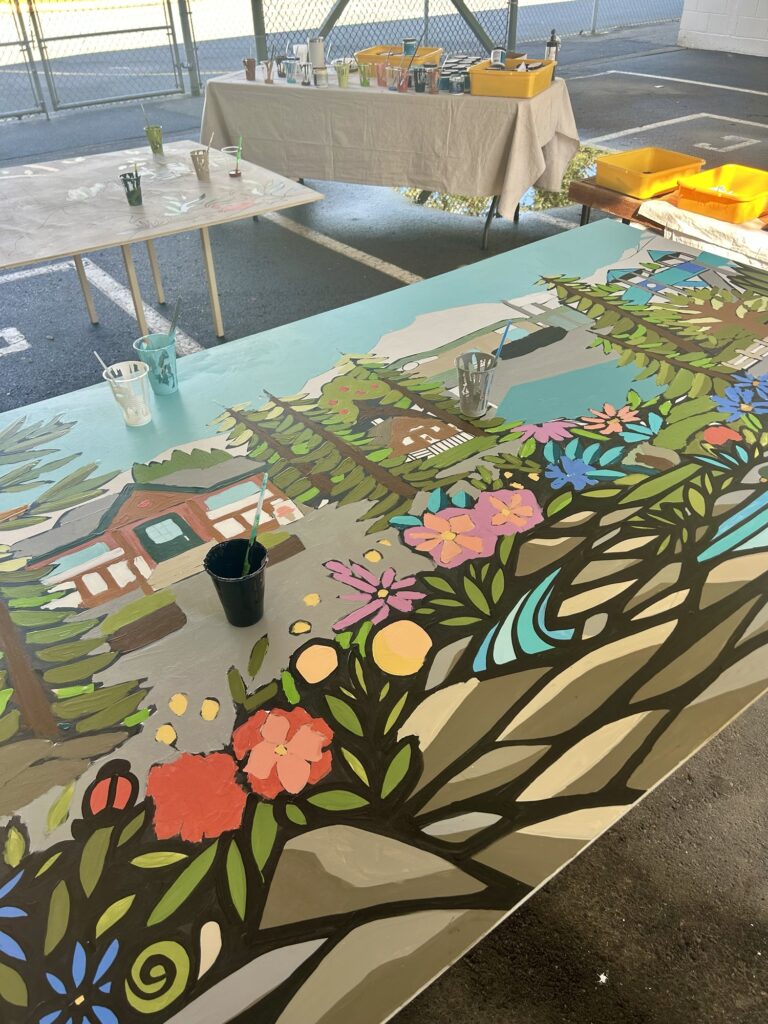
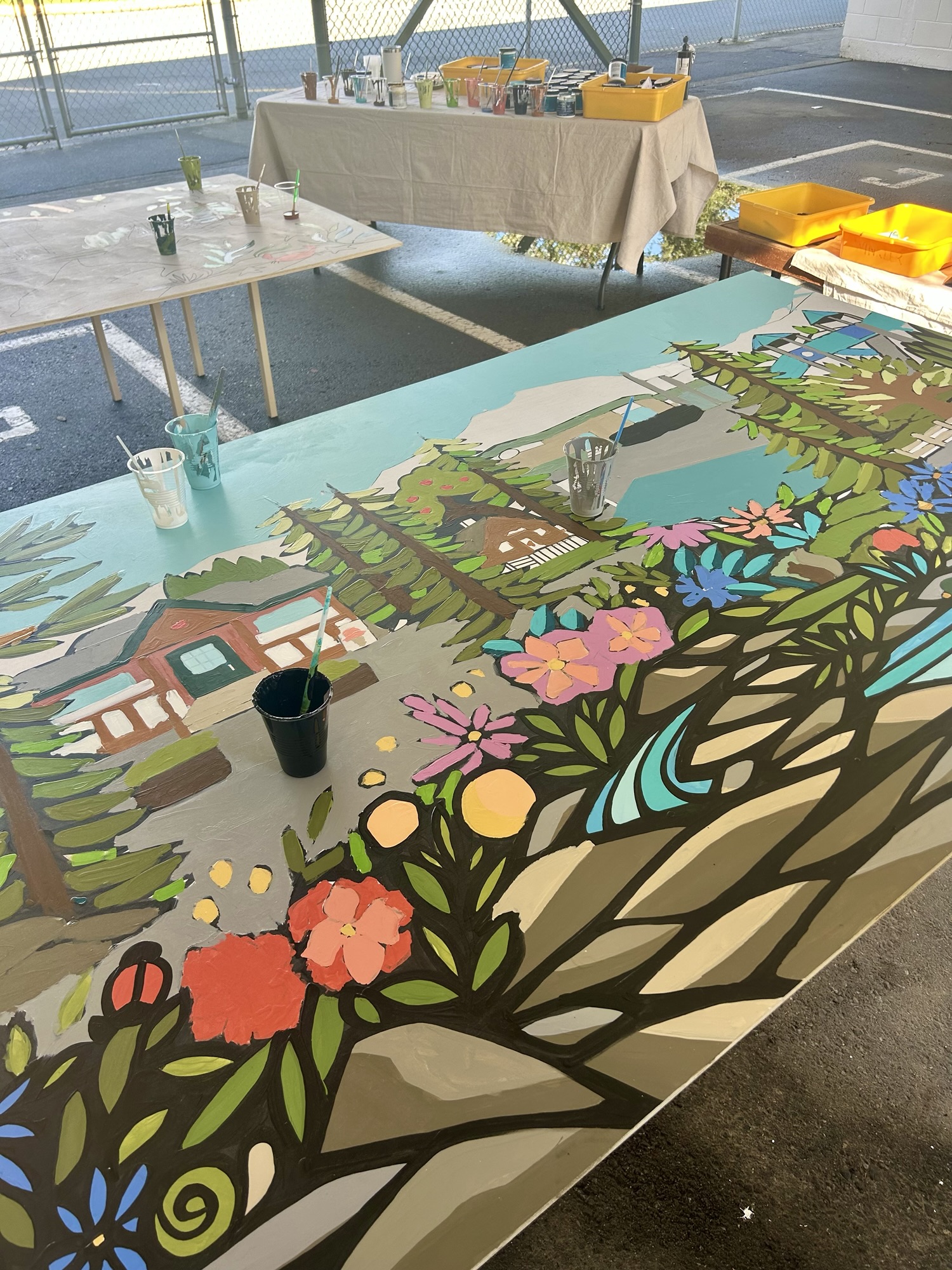
Image credit: Me

The photo above is from my final practicum, where every student in the class had the chance to collaborate and engage hands-on while creating this mural.

Multimedia Without Video Games

I don’t have personal experience with video game-based learning, but I do see many of the same learning principles reflected in everyday classroom technologies. Tools like short instructional videos, interactive slides and digital whiteboards often align with Mayer’s multimedia principles, especially signaling and segmenting. When information is broken into smaller chunks and key ideas are clearly highlighted, students are more likely to stay focused and understand what matters.

In terms of Merrill’s First Principles of Instruction, I see demonstration and application used most often. Students watch a model, then try something similar themselves; though, I have noticed that integration is often missing. Students complete tasks but aren’t always given time to reflect, explain their thinking or connect their learning to real-world contexts. That reflection piece feels essential for learning to really stick.

Designing an Authentic Problem

If I were designing a lesson using Merrill’s principles, I’d start with a real problem that students can see and care about, something like improving sustainability or inclusivity in their school. Students could begin by identifying a problem (too much waste, limited accessibility, lack of outdoor learning spaces), then explore examples through photos or short videos from other schools.

For example, the YouTube video below on inquiry-based learning shows students actively asking questions, investigating ideas and making decisions, making the concept of “doing” tangible and illustrating how collaboration and problem-solving bring learning to life. From there, students could work in groups to design a solution using drawings, simple models or digital planning tools. Multimedia would support this process rather than lead it; students might document their ideas with photos, create a short video explanation or design a digital poster to share their proposal. These tools help students communicate their thinking and reflect on their choices, which connects directly to active learning.

Alignment That Actually Makes Sense

One thing I appreciate about this course is the clear constructive alignment between readings, learning outcomes and assignments. We aren’t just reading about theory, we’re expected to apply it in reflective, meaningful ways. I’ve taken other courses where the connection between content and assessment felt unclear, which often led to surface-level learning. When backward design is done well, the learning feels purposeful rather than performative.

Enhancing Historia With Multimedia

I really liked the Historia example because it proves that active learning doesn’t need to be high-tech. Students are already making decisions, analyzing information and discussing outcomes. Thoughtful multimedia could enhance this by adding interactive maps, primary source images or short audio clips representing different historical perspectives. These additions would allow students to explore context and consequence more deeply, without changing the core inquiry-based structure.

Why “Doing” Still Matters

The reading Students Need to DO Something strongly resonated with my own K-12 experiences, where passive learning was often the norm. I think active learning isn’t more common because it requires time, flexibility and a willingness to let students take the lead. In my own teaching, even small shifts, like hands-on investigations, collaborative problem-solving or student-created representations have made a noticeable difference. This week reinforced for me that when students are actively doing, thinking and reflecting, learning becomes deeper and far more meaningful.

Substantive Post #1: Theories of Multimedia Learning

Rethinking Multimedia in Educational Design

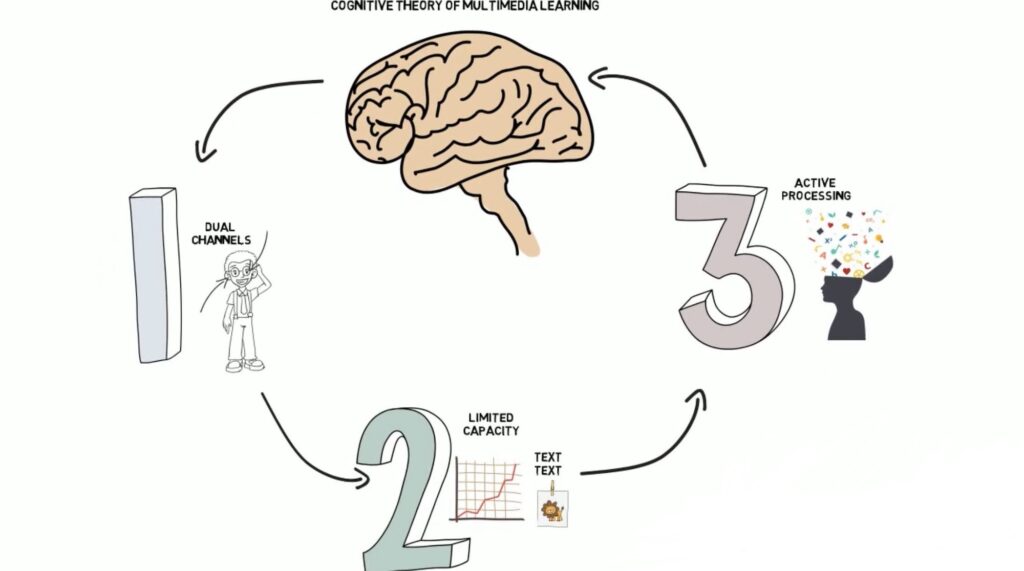
The theories of multimedia learning explored in this module have genuinely shifted how I think about educational design. Rather than asking which tools or platforms are the most engaging, these readings pushed me to focus on how learners process information and why certain combinations of text, images and audio work better than others. The Cognitive Theory of Multimedia Learning (CTML) offers a powerful framework for understanding learning at a neurological and cognitive level, reminding designers that more media does not automatically lead to better learning.

When Less Really Is More

Several of the principles immediately felt intuitive based on my own experiences as both a learner and a developing educator. The coherence principle, which emphasizes removing extraneous material, resonated strongly. I have often felt overwhelmed by slides or online modules filled with decorative images, background music or dense blocks of text. Learning that these elements compete for limited working memory helped validate why simpler, more focused designs often feel clearer and more effective.

The signaling principle also felt familiar. Headings, arrows and visual emphasis have always helped me identify what matters most and how ideas connect. Seeing this instinct supported by cognitive theory helped me recognize these strategies as intentional design choices rather than just personal preferences.

Confronting the Limits of Cognitive Load

What surprised me most was the strict limitation of cognitive capacity described in CTML. I had previously assumed that motivated learners could adapt to complex or overloaded presentations. The readings challenged this assumption, emphasizing that even highly engaged learners can struggle when cognitive load is poorly managed.

The split-attention effect, in particular, made me reflect on how often text and images are separated across slides or webpages. When learners have to constantly shift their attention to mentally integrate information, valuable cognitive energy is lost, often without designers realizing it.

Learning from Social Media Design

Interestingly, social media platforms like Instagram and TikTok demonstrate how effective multimedia design can be when text and visuals are intentionally aligned. Short captions, strong visual focal points and minimal on-screen text closely reflect CTML principles such as coherence and signaling, even though the primary goal is engagement rather than learning. Embedding screenshots or short video examples from these platforms could be a useful way to illustrate how multimedia principles show up in familiar, everyday contexts.

Reflecting on My Own Learning Habits

I also realized that I have intuitively followed the dual-coding principle when taking notes by doodling diagrams, symbols and visual metaphors alongside written text. This approach supports deeper understanding and synthesis rather than passive transcription. At the same time, I noticed that I haven’t always applied the coherence principle in my own teaching materials, often adding extra text “just in case.” Moving forward, I want to be more intentional by asking whether each element directly supports the learning goal.

Designing with Cognitive Care

When I imagine creating educational content for my own projects, I now picture learners who may already feel cognitively overloaded. This perspective encourages me to prioritize clarity, pacing and accessibility. Principles such as modality, spatial contiguity and segmenting feel especially important, though challenging, because they require letting go of the urge to include everything at once.

By incorporating diagrams, short videos and annotated visuals thoughtfully rather than decoratively, I can design multimedia experiences that truly support learning rather than distract from it.