At the beginning of this course, I described myself as a teacher with a strong background in pedagogy who was beginning to see myself as a developing multimedia designer. My main goal in this course was to become more confident and intentional when designing interactive multimedia learning experiences instead of relying on pre-made templates or tools. Looking back at my initial flight path, I feel like I did meet many of the goals I set for myself, although the process involved more experimentation than I expected. At first, I assumed the course would mostly focus on learning new tools or technical skills. While those were certainly part of the experience, I quickly realized that the deeper learning was about understanding how multimedia design connects to how people learn. Over time, I began to see multimedia less as something that simply makes lessons look engaging and more as a way to structure information, guide attention and support student understanding.
One of the most valuable things I learned in this course was how learning theory informs interactive and multimedia design decisions. Concepts like cognitive load, accessibility and the organization of information helped me think more carefully about how learners interact with digital materials. Instead of adding visuals or interactive elements just because they looked interesting, I started asking whether they actually supported the learning goal. This shift helped me better understand the course objectives around applying multimedia design principles and thinking more intentionally about design choices. Creating prototypes such as blogs and comics gave me the opportunity to experiment with visual hierarchy, pacing, and the relationship between text and images. I found that storytelling elements were particularly effective when thinking about how learners move through information. Structuring content through narrative or visual sequences helped make ideas feel more engaging and easier to follow.
At the same time, the comic assignment was probably the most challenging part of the course for me. Creativity and visual creation are not areas where I naturally feel very confident, so translating an idea into a comic format pushed me outside my comfort zone. I found it difficult to think about how to communicate ideas visually and how to structure the panels so that the story and learning message were clear. Even though it was challenging, working through that assignment helped me better understand the role of storytelling and visual communication in multimedia design. In contrast, one of my favourite parts of the course was the engagement on Mattermost and the opportunity to collaborate with my group during the OER multimedia challenge. Those conversations made the course feel more interactive and gave me the chance to see how other people approached similar design problems. Working with my group helped generate new ideas and made the learning experience feel more collaborative and supportive.
Another important aspect of the course was learning to approach multimedia projects through a design thinking process. Brainstorming, prototyping, testing and reflecting helped me see design as something that develops over time rather than something that needs to be perfect on the first attempt. This way of thinking made it easier to experiment and learn from mistakes. Instead of feeling stuck when something did not work, I started to see those moments as part of the design process. Feedback from classmates also helped me refine my ideas and notice aspects of my designs that I might have overlooked. Overtime, I became more comfortable trying new approaches and making adjustments as my projects developed.
Overall, my perspective on multimedia in education has grown quite a bit over the semester. At the beginning of the course, I mostly thought about multimedia as a way to present information visually. Now I see it more as a way to design learning experiences that are interactive, purposeful and accessible for a wide range of learners. Looking ahead, I can imagine using the skills from this course to create visual explanations, storytelling-based lessons or simple interactive resources that support student engagement. I am also interested in giving students opportunities to create their own multimedia artifacts, such as comics or other visual projects, as a way to demonstrate their understanding and share their ideas. While I still feel like I am continuing to develop my technical and creative skills, I leave this course feeling more confident experimenting with multimedia and more aware of how thoughtful design can support meaningful learning experiences.
Updated: February, 24 2026 Author: Anna McClintock
Project Introduction:
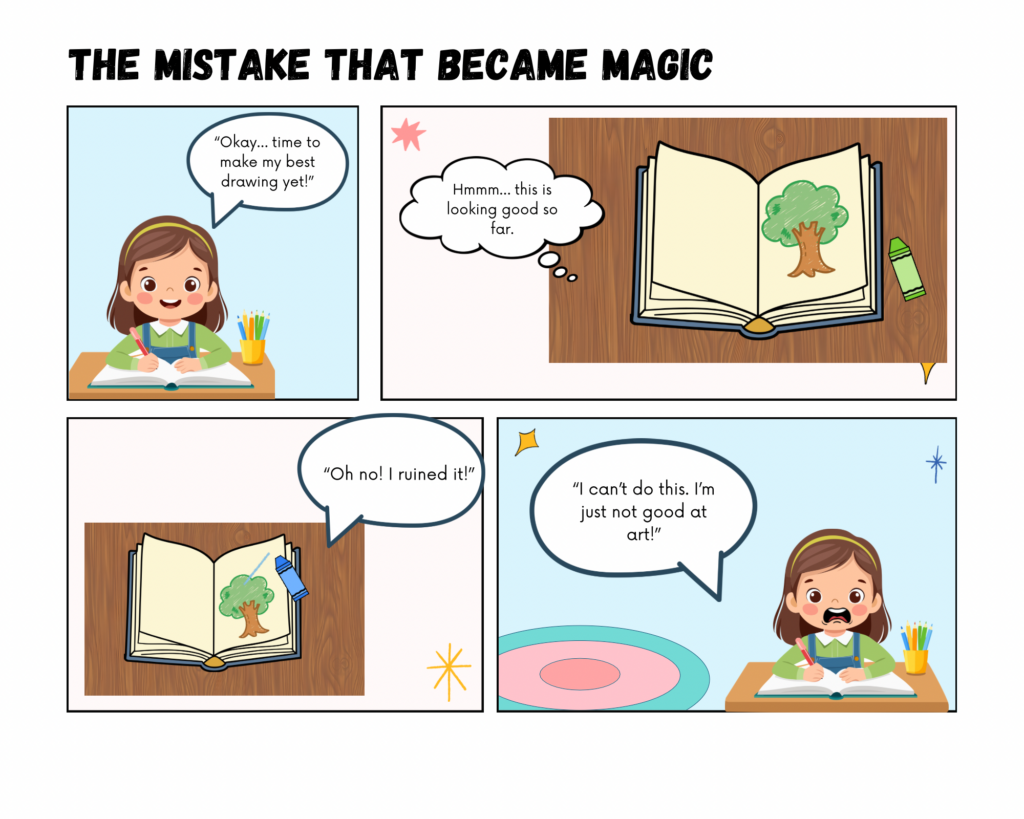
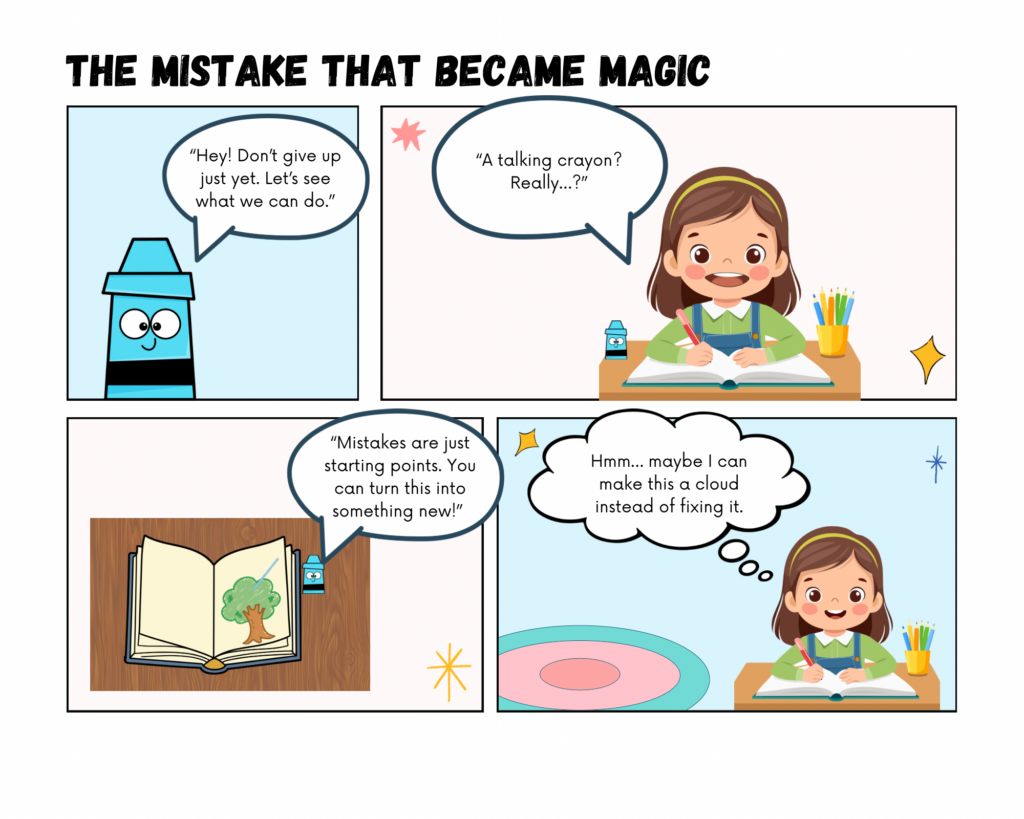
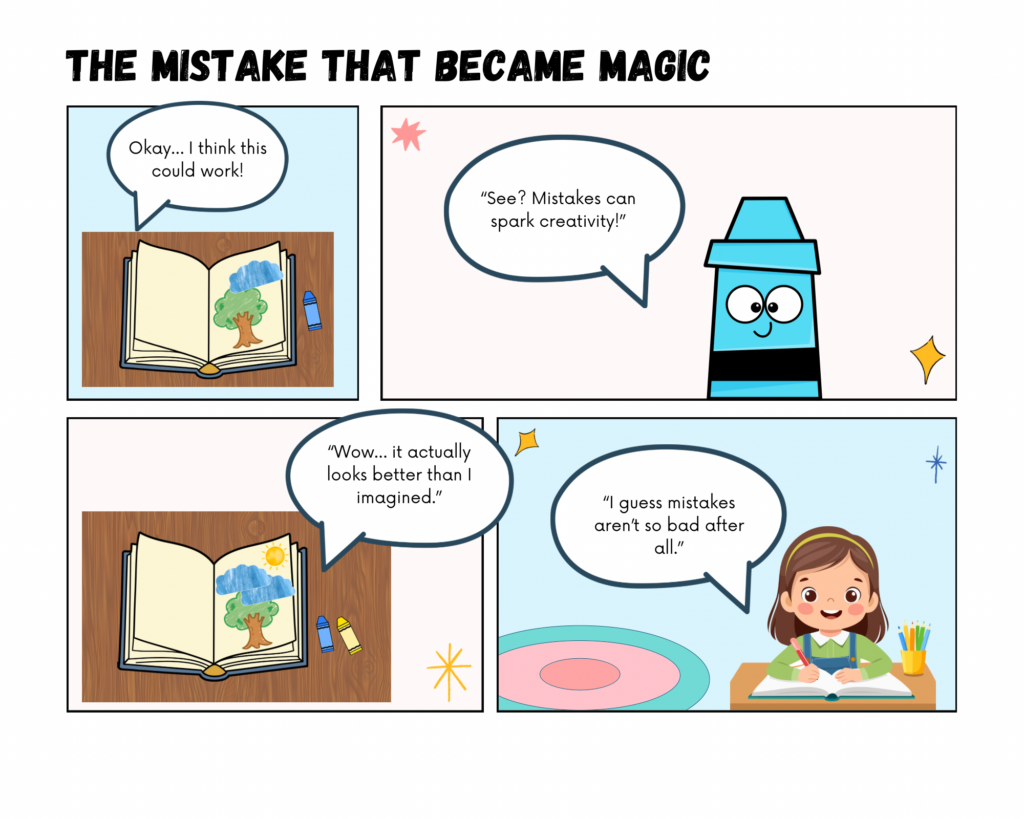
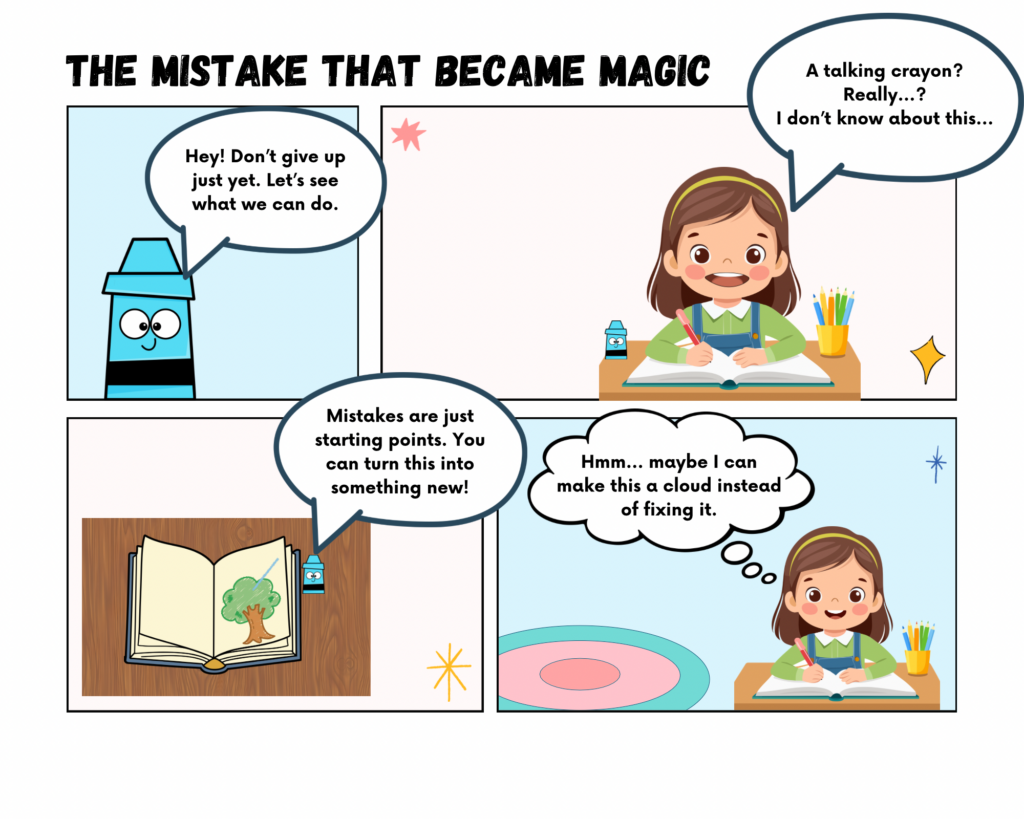
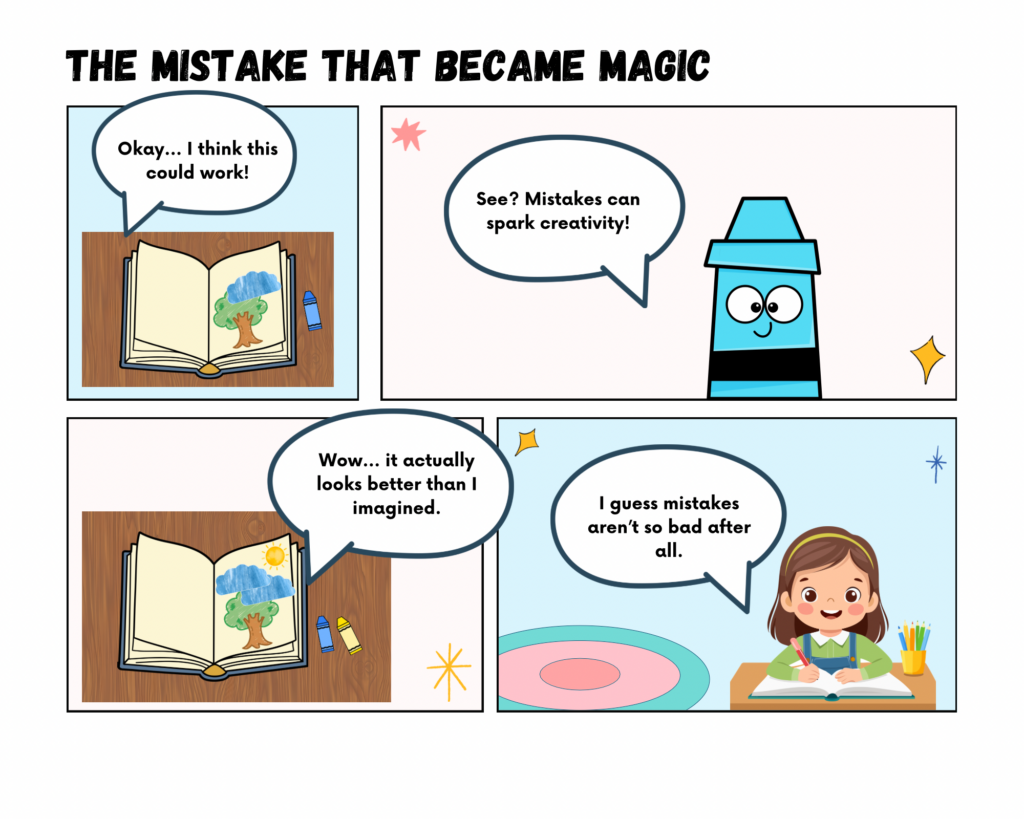
I am creating an educational comic that explores how mistakes can become opportunities for creativity and learning. The story follows a student who feels frustrated after “ruining” a drawing and wants to quit. Through the guidance of an imaginative character (a crayon), the student learns to see mistakes as part of the creative process rather than as failure. I chose this topic because growth mindset and creative problem solving are essential ideas in both art education and classroom learning. Many students become discouraged when work does not match their expectations and I wanted to create a story that models a more supportive and realistic response to frustration.
This project is being developed individually, which gives me flexibility to experiment with pacing, panel structure and visual storytelling. My goal is to create a comic that feels accessible to elementary learners while still communicating a meaningful message about persistence and adaptability. I want readers to recognize their own experiences in the main character and understand that creative work often involves revision and transformation.
I am especially interested in how comics can teach emotional skills alongside artistic concepts. The format allows exaggerated expressions, humour and visual change to show how a mistake can evolve into something new. Throughout the process, I am paying attention to how layout, sequencing and imagery influence understanding. I see this project as both a design exercise and a pedagogical exploration of how storytelling can normalize struggle and encourage students to stay engaged in their learning.
THE PROCESS
Understand (Discover, Interpret, Specify)
Describe the Challenge:
Students often become frustrated when their work does not meet expectations and may give up, limiting opportunities for creative problem solving and growth mindset development.
Context and Audience:
The primary audience is elementary-aged students (ages 7–10) who are learning to manage frustration and develop persistence in creative tasks. Typically, these students have limited experience reframing mistakes as opportunities and may need explicit guidance and modeling.
Extreme cases include students who are highly perfectionistic or anxious about making mistakes, who might avoid creative tasks entirely. These learners require extra scaffolding to see that errors are part of learning rather than evidence of failure.
Motivations for the audience include curiosity, play and the desire to succeed or receive positive feedback. Students may have varying levels of confidence, self-regulation and previous experience with art or creative work. Behavioural factors include short attention spans, reliance on teacher direction and high sensitivity to perceived judgment.
The learning context includes classroom environments where students engage in visual arts, storytelling or project-based tasks. Accessibility considerations involve clear visual storytelling, concise text and character relatability, ensuring all students can engage regardless of literacy level or prior experience with art.
POV Statement:
An elementary student frustrated by mistakes needs guidance to reframe errors as opportunities so that they can build confidence, develop creative problem-solving skills and persist through challenges.
Learning Objectives:
Primary Objective: Students will learn to approach mistakes as opportunities for exploration and adaptation.
Sub-objectives:
Recognize that errors are a natural part of learning.
Experiment with alternative solutions after a perceived failure.
Reflect on personal emotional responses to frustration.
Promote interest in creative activities and meta-cognitive awareness of problem-solving strategies.
Plan (Ideate, Sketch, Elaborate)
Ideation:
Brainstorming included reviewing examples of educational comics and reflecting on classroom experiences. I sketched multiple ideas where characters interact with mistakes: a student alone, a student guided by a teacher and a student assisted by a talking art supply (pencil, brush or paint). The most promising prototype uses a talking crayon as a playful mentor, making abstract concepts accessible and visually engaging.
Storyboard / Script:
12 panels showing the student starting a drawing then making a “mistake” then getting frustration then a talking pencil appears then guided exploration of new ideas then a transformation of the mistake and lastly, pride in revised artwork.
Panels include a mix of dialogue, thought bubbles and visual cues showing emotion and creative strategies.
Theory Applied:
Growth Mindset (Dweck, 2006): Encourages students to see challenges and errors as opportunities for development. Used in the narrative by modeling persistence and reframing mistakes.
Universal Design for Learning (UDL): Multiple means of representation (visual & textual), engagement (humor, relatable character) and expression (student can imagine applying strategies themselves).
Multimedia Learning Principles (Mayer): Combining text and images to reduce cognitive load and support dual coding, making abstract ideas about mistakes tangible.
Prototype (Create & Share)
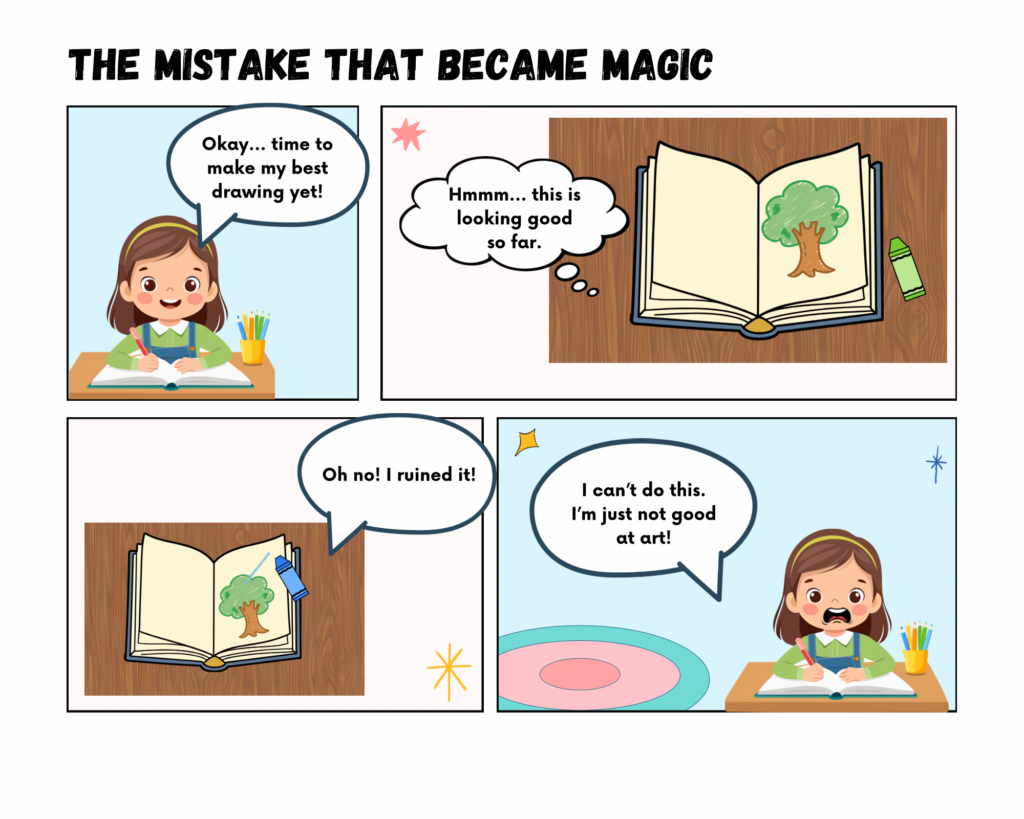
Comic Title: The Mistake that Became Magic
Peer Feedback
Across both peer responses, the feedback highlighted strong alignment between the concept, audience and theoretical frameworks. My peers noted that the comic clearly supports growth mindset principles by showing mistakes transforming rather than disappearing. They identified effective integration of UDL through visual storytelling, minimal text and accessible layout. Multimedia learning principles such as coherence, contiguity and signaling were also recognized. The personification of the crayon was described as developmentally appropriate and engaging for younger learners. My peers commented positively on the clarity of the images, the structured background, the strong POV statement and the focus on emotional safety, particularly in normalizing frustration and reducing pressure around mistakes.
One of my peers suggested that the emotional shift from frustration to acceptance may occur too quickly and recommended adding a panel that shows hesitation or resistance. There were also questions about how the comic could be more explicitly integrated into classroom practice, such as including a follow-up activity where students transform their own mistakes. Additional recommendations included clarifying key takeaways or assessment possibilities, considering an interactive element to support active learning, refining specific lines of dialogue and removing quotation marks from speech bubbles.
Accessibility and inclusion were also raised as areas for consideration. Feedback encouraged thinking about learners with disabilities who may require adaptations to begin creative tasks, as well as exploring options such as script highlighting for e-readers or larger, bolder fonts for visually impaired students. One of my peers questioned a background design choice in a specific panel and suggested considering visual consistency. Overall, both peers described the project as well-developed and theoretically grounded, with suggested refinements focused on emotional pacing, accessibility, classroom application and minor design adjustments.
Reflect and Refine
One aspect of the prototype that worked well was the strong alignment between intention, audience and theory. The comic clearly targeted younger elementary learners and intentionally reduced extraneous cognitive load through simple backgrounds, minimal text and consistent layout. Peer feedback affirmed that coherence, contiguity and signaling principles (Mayer, 2009) were evident in the pairing of dialogue and imagery. The personification of the crayon also supported emotional accessibility, offering learners a psychologically safe entry point into the concept of mistakes. By visually transforming the mistake rather than erasing it, the prototype embodied growth mindset principles (Dweck, 2006) in both language and design. The structured sequencing from frustration to experimentation mirrored authentic classroom experiences and supported emotional normalization, which aligns with research on affect and learning.
However, peer feedback highlighted that the emotional shift may occur too quickly for some learners. In response, I recognized that authentic emotional processing is not always linear. To address this, I revised the prototype by adding to a speech bubble where the learner hesitates and questions the crayon’s suggestion slightly. This adjustment validates resistance and reflects more realistic emotional pacing. I also revised specific dialogue for clarity and encouragement, removed quotation marks from speech bubbles for visual consistency and adjusted font size and boldness so it is all cohesive. These revisions strengthen narrative authenticity while preserving cognitive clarity.
Another issue raised involved classroom integration and assessment. While the prototype centered primarily on mindset development, peer feedback encouraged me to think more explicitly about how the comic could function instructionally. I reflected on how the comic might naturally extend into classroom dialogue or follow-up opportunities. This process helped me recognize the importance of connecting design intentions to active learning principles, even if those extensions are not fully developed within the prototype itself. It also prompted me to clarify the intended takeaway: that mistakes are iterative starting points in both creative and academic processes.
Peers also raised important considerations around inclusion, particularly for learners who may require additional support to begin creative tasks. This feedback led me to reflect more deeply on the affordances and constraints of multimedia learning. While the comic format can reduce extraneous cognitive load and support dual coding through image to text pairing (Mayer, 2009), it cannot independently meet all learner needs. Universal Design for Learning principles (CAST, 2018) remind us that accessibility and differentiation require ongoing teacher responsiveness. As a result, I began thinking more critically about how this prototype would operate within a broader instructional context rather than as a standalone tool.
Overall, this process reinforced that multimedia learning tools must balance clarity with emotional depth. The comic format is powerful for modeling internal dialogue, visualizing abstract concepts and reducing performance pressure. At the same time, its limitations include pacing constraints, accessibility considerations and reliance on teacher implementation for deeper transfer. The peer feedback strengthened the prototype by pushing me to deepen emotional realism, expand active engagement and consider broader inclusion. This iterative revision process reflects the very mindset the comic promotes: design, test, reflect and refine.
Visuals: Dynamic, real-time visual representation of photosynthesis processes.
Interaction: Learners manipulate variables and immediately see effects.
Presentation Style: Exploratory, learner-directed and flexible pacing.
Audience Engagement: High level engagement encourages experimentation, observation and discovery.
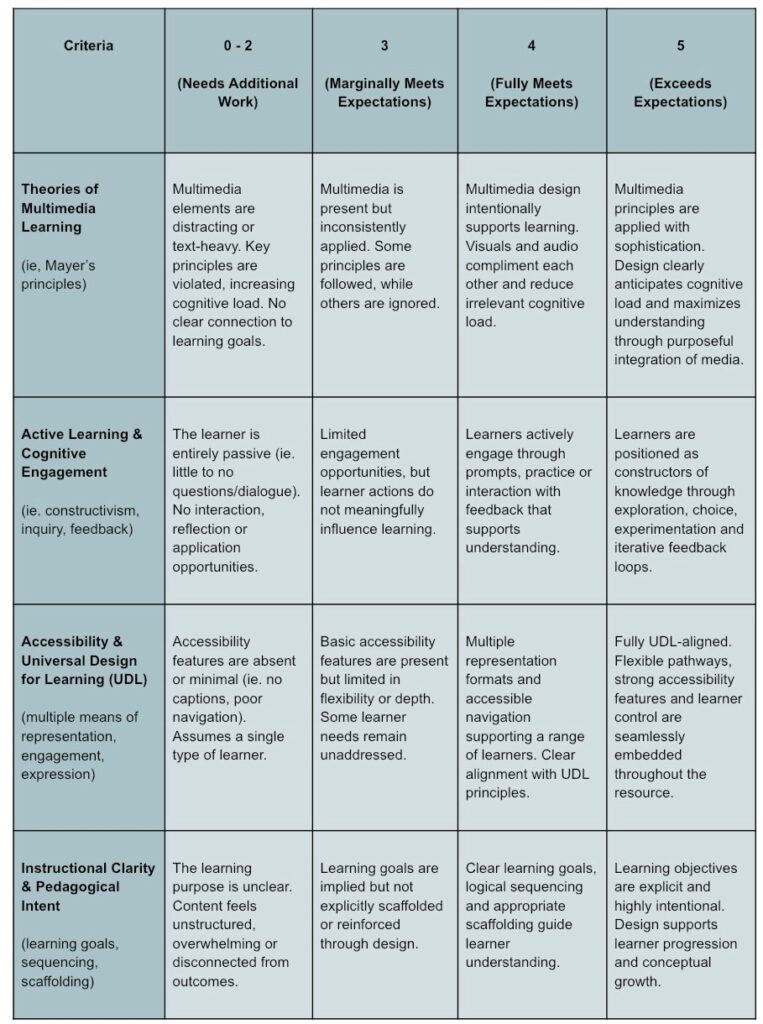
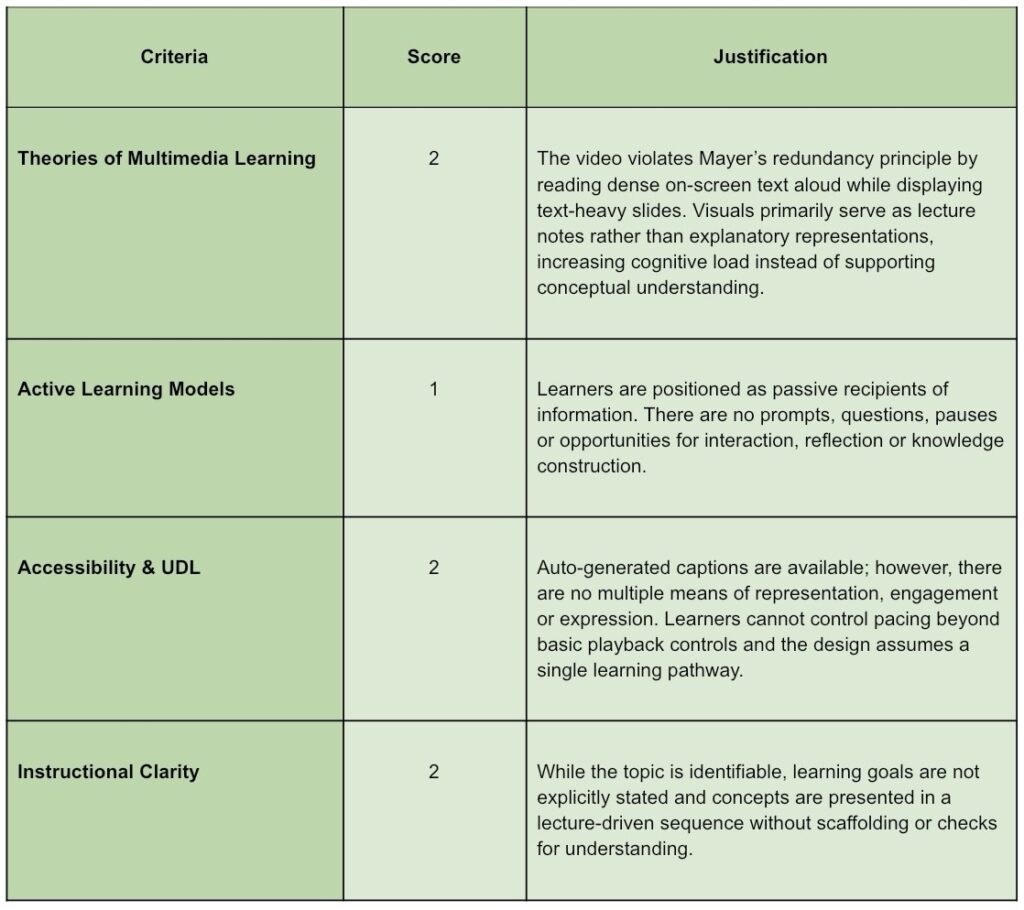
Evaluation Using the Multimedia Assessment Rubric
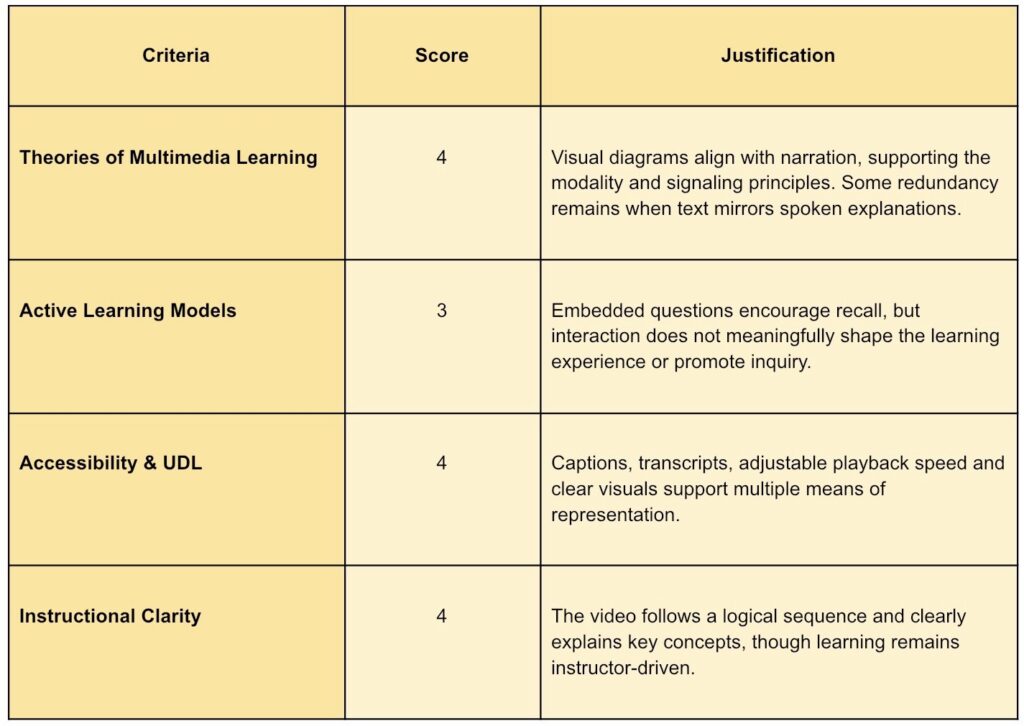
Resource 1: Poor Quality
Created by Me
Overall Evaluation:
This resource reflects a transmission-based approach to learning and demonstrates limited awareness of multimedia learning theory, active learning models or UDL principles.
Resource 2: Okay Quality
Created by Me
Overall Evaluation:
This resource demonstrates strong alignment with multimedia learning theory and accessibility practices but only partially engages learners in active meaning-making.
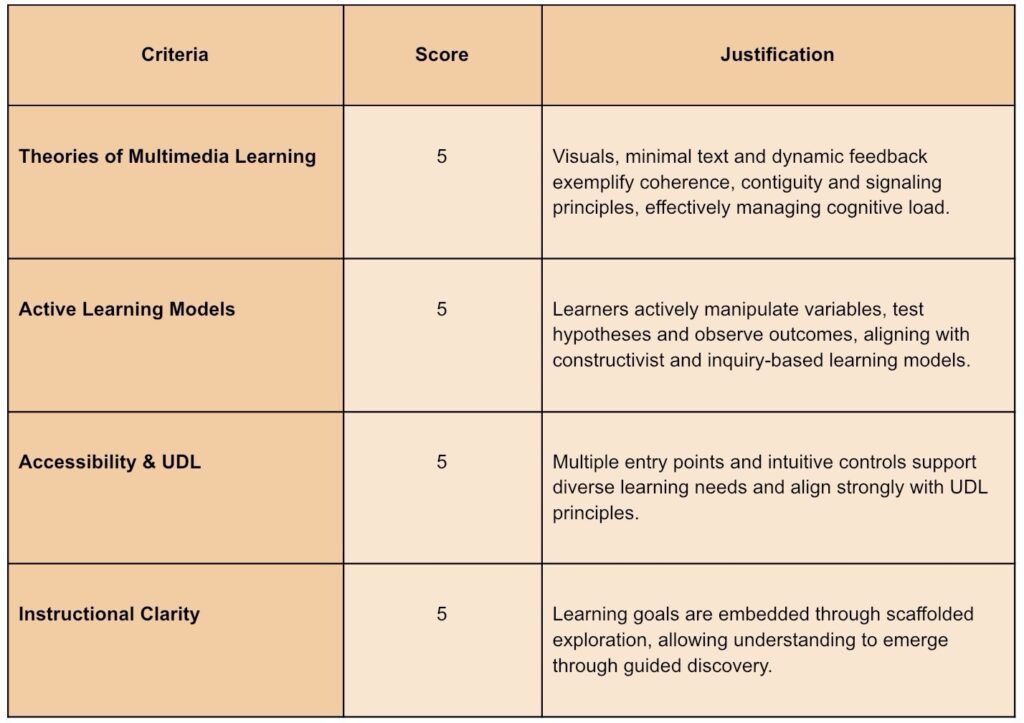
Resource 3: Excellent Quality
Created by Me
Overall Evaluation:
This resource represents excellent practice in multimedia instructional design by seamlessly integrating theory, accessibility and active learning into a cohesive learner-centered experience.
Resources
BioProfessor101. (2017, January 27). Biology 1010 lecture 8: Photosynthesis. YouTube.
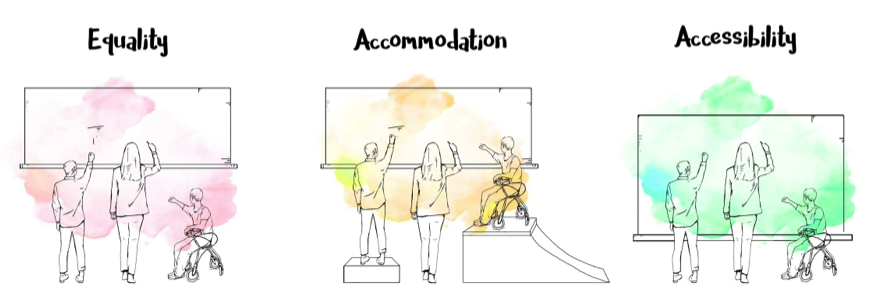
Accessibility in education is often framed as something we add after a problem shows up, an accommodation, a workaround, a special support for a few learners. Exploring and reflecting on Universal Design for Learning (UDL) and inclusive design has pushed me to rethink that idea entirely. Accessibility isn’t reactive, it’s intentional. It’s about designing learning experiences from the start with the understanding that learners are diverse in how they think, process, move and engage.
When barriers exist, they’re often not about a learner’s ability, but about a mismatch between people and the environments they’re expected to learn in. When those environments are designed more thoughtfully, many barriers fade away or never appear in the first place.
Accessibility as a Foundation for Inclusion
This way of thinking connects closely to the social model of disability and the core principles of UDL: multiple means of engagement, representation and expression. What feels most affirming about UDL is how familiar it is. The strategies UDL promotes (choice, flexibility, varied ways of showing understanding) are already hallmarks of good teaching.
For example, a TEDxTalk on the power of inclusive education illustrates how classrooms can be structured so that all learners actively participate, contribute and support one another’s thinking, modeling the kind of collaborative, student-centered engagement that active learning aims to promote. When students can access content in different ways and express their learning through multiple formats, participation increases across the board. Accessibility doesn’t single students out or label them as needing something “extra.” Instead, it creates learning conditions where more students can succeed without having to ask for special support.
Designing Accessible Multimedia
Accessibility becomes especially important when learning shifts into multimedia and interactive spaces. While multimedia can be engaging and powerful, it can also create barriers if meaning is locked into a single sensory channel. One key takeaway from the Accessible Multimedia reading was that accessibility isn’t about stripping media of creativity, it’s about expanding how meaning is communicated.
Captions, transcripts and audio descriptions are often thought of as niche supports, but they benefit far more learners than we tend to realize. English language learners, students processing dense information or anyone who prefers reading along while listening all benefit. Clear layout, thoughtful pacing and reduced cognitive load also make multimedia experiences more welcoming and easier to navigate.
Inclusive Design in Practice
Inclusive design asks us to design with difference as the norm, not the exception. There is no “average” learner and once that idea is let go, lesson planning starts to shift. Rather than asking who might struggle, I find myself asking how learning can offer multiple entry points from the beginning.
This shift feels both challenging and reassuring. It challenges habits rooted in one-size-fits-all thinking, but it also aligns closely with my experiences using UDL-informed strategies in inclusive classrooms.
Because graphic design is so visually driven, it can unintentionally exclude learners if information is communicated only through images or colour. Pairing visuals with clear text, consistent layouts, strong contrast and audio explanations makes content more accessible for learners with visual impairments and often clearer for everyone else.
Accessibility is Just Better Design
Ultimately, accessibility and UDL push educators and designers toward learning environments that are flexible, thoughtful and human-centered. When accessibility is treated as a foundation rather than an add-on, it leads to better design, design that acknowledges and supports the many ways learners engage with the world.
Active learning is often described as “getting students involved,” but this week’s reading reminded me that it’s really about how learning is designed. Students aren’t just busy, they’re actively constructing understanding through meaningful tasks. What stood out to me most in Models of Active Learning is that technology and multimedia don’t automatically make learning active. Without thoughtful design, they can easily become distractions rather than supports.
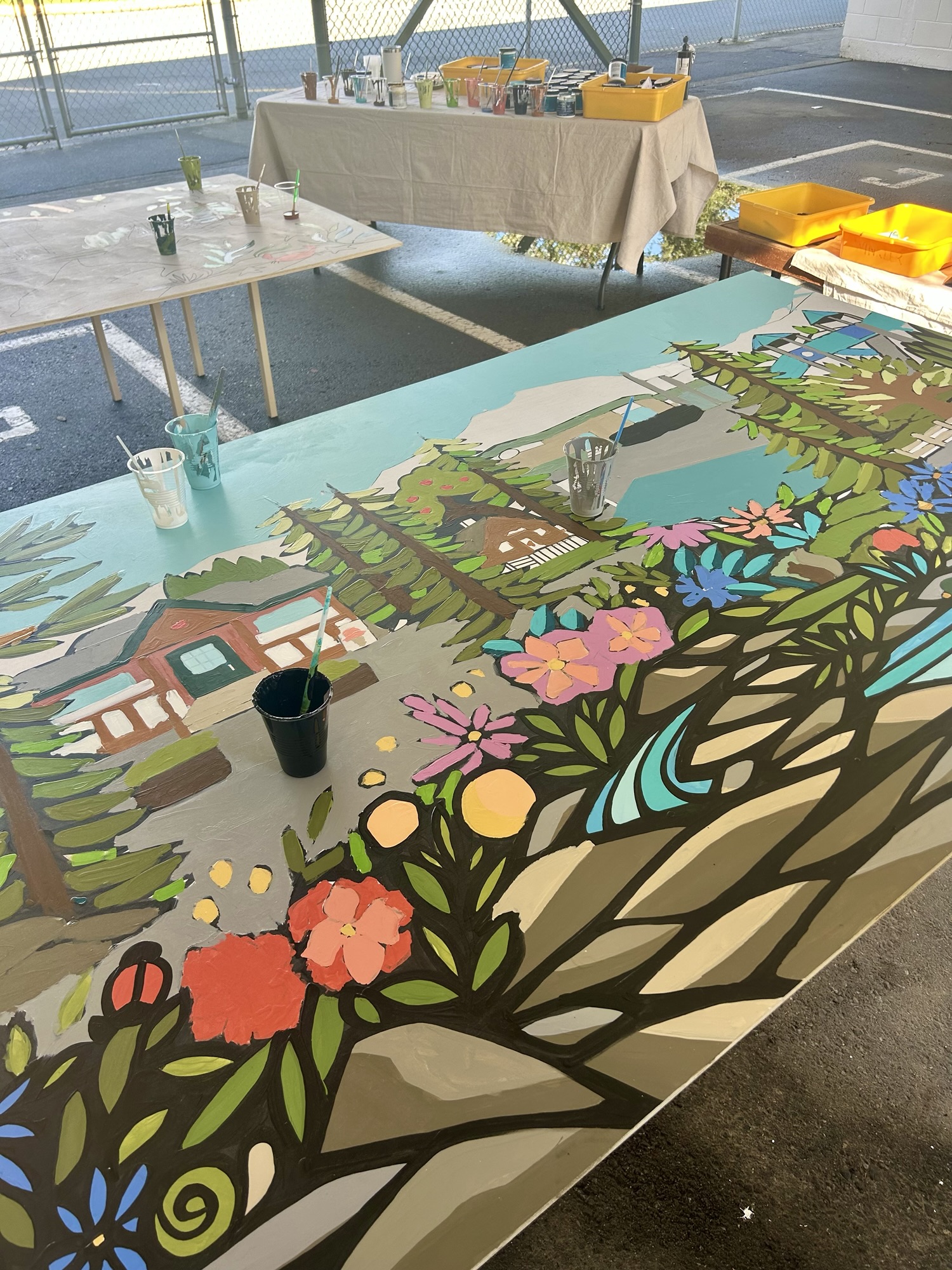
Image credit: Me
The photo above is from my final practicum, where every student in the class had the chance to collaborate and engage hands-on while creating this mural.
Multimedia Without Video Games
I don’t have personal experience with video game-based learning, but I do see many of the same learning principles reflected in everyday classroom technologies. Tools like short instructional videos, interactive slides and digital whiteboards often align with Mayer’s multimedia principles, especially signaling and segmenting. When information is broken into smaller chunks and key ideas are clearly highlighted, students are more likely to stay focused and understand what matters.
In terms of Merrill’s First Principles of Instruction, I see demonstration and application used most often. Students watch a model, then try something similar themselves; though, I have noticed that integration is often missing. Students complete tasks but aren’t always given time to reflect, explain their thinking or connect their learning to real-world contexts. That reflection piece feels essential for learning to really stick.
Designing an Authentic Problem
If I were designing a lesson using Merrill’s principles, I’d start with a real problem that students can see and care about, something like improving sustainability or inclusivity in their school. Students could begin by identifying a problem (too much waste, limited accessibility, lack of outdoor learning spaces), then explore examples through photos or short videos from other schools.
For example, the YouTube video below on inquiry-based learning shows students actively asking questions, investigating ideas and making decisions, making the concept of “doing” tangible and illustrating how collaboration and problem-solving bring learning to life. From there, students could work in groups to design a solution using drawings, simple models or digital planning tools. Multimedia would support this process rather than lead it; students might document their ideas with photos, create a short video explanation or design a digital poster to share their proposal. These tools help students communicate their thinking and reflect on their choices, which connects directly to active learning.
Alignment That Actually Makes Sense
One thing I appreciate about this course is the clear constructive alignment between readings, learning outcomes and assignments. We aren’t just reading about theory, we’re expected to apply it in reflective, meaningful ways. I’ve taken other courses where the connection between content and assessment felt unclear, which often led to surface-level learning. When backward design is done well, the learning feels purposeful rather than performative.
Enhancing Historia With Multimedia
I really liked the Historia example because it proves that active learning doesn’t need to be high-tech. Students are already making decisions, analyzing information and discussing outcomes. Thoughtful multimedia could enhance this by adding interactive maps, primary source images or short audio clips representing different historical perspectives. These additions would allow students to explore context and consequence more deeply, without changing the core inquiry-based structure.
Why “Doing” Still Matters
The reading Students Need to DO Something strongly resonated with my own K-12 experiences, where passive learning was often the norm. I think active learning isn’t more common because it requires time, flexibility and a willingness to let students take the lead. In my own teaching, even small shifts, like hands-on investigations, collaborative problem-solving or student-created representations have made a noticeable difference. This week reinforced for me that when students are actively doing, thinking and reflecting, learning becomes deeper and far more meaningful.
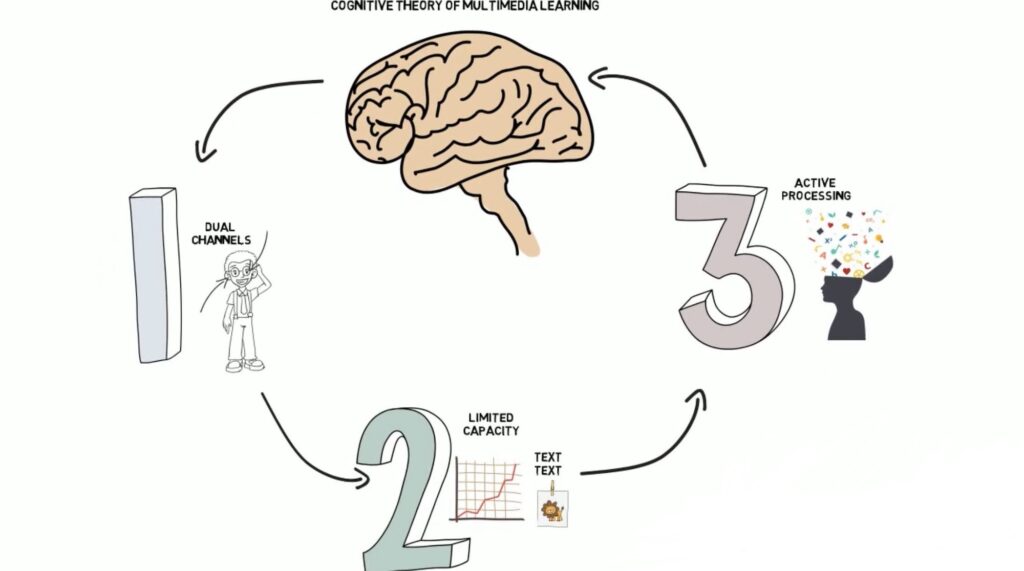
The theories of multimedia learning explored in this module have genuinely shifted how I think about educational design. Rather than asking which tools or platforms are the most engaging, these readings pushed me to focus on how learners process information and why certain combinations of text, images and audio work better than others. The Cognitive Theory of Multimedia Learning (CTML) offers a powerful framework for understanding learning at a neurological and cognitive level, reminding designers that more media does not automatically lead to better learning.
Several of the principles immediately felt intuitive based on my own experiences as both a learner and a developing educator. The coherence principle, which emphasizes removing extraneous material, resonated strongly. I have often felt overwhelmed by slides or online modules filled with decorative images, background music or dense blocks of text. Learning that these elements compete for limited working memory helped validate why simpler, more focused designs often feel clearer and more effective.
The signaling principle also felt familiar. Headings, arrows and visual emphasis have always helped me identify what matters most and how ideas connect. Seeing this instinct supported by cognitive theory helped me recognize these strategies as intentional design choices rather than just personal preferences.
Confronting the Limits of Cognitive Load
What surprised me most was the strict limitation of cognitive capacity described in CTML. I had previously assumed that motivated learners could adapt to complex or overloaded presentations. The readings challenged this assumption, emphasizing that even highly engaged learners can struggle when cognitive load is poorly managed.
The split-attention effect, in particular, made me reflect on how often text and images are separated across slides or webpages. When learners have to constantly shift their attention to mentally integrate information, valuable cognitive energy is lost, often without designers realizing it.
Learning from Social Media Design
Interestingly, social media platforms like Instagram and TikTok demonstrate how effective multimedia design can be when text and visuals are intentionally aligned. Short captions, strong visual focal points and minimal on-screen text closely reflect CTML principles such as coherence and signaling, even though the primary goal is engagement rather than learning. Embedding screenshots or short video examples from these platforms could be a useful way to illustrate how multimedia principles show up in familiar, everyday contexts.
I also realized that I have intuitively followed the dual-coding principle when taking notes by doodling diagrams, symbols and visual metaphors alongside written text. This approach supports deeper understanding and synthesis rather than passive transcription. At the same time, I noticed that I haven’t always applied the coherence principle in my own teaching materials, often adding extra text “just in case.” Moving forward, I want to be more intentional by asking whether each element directly supports the learning goal.
When I imagine creating educational content for my own projects, I now picture learners who may already feel cognitively overloaded. This perspective encourages me to prioritize clarity, pacing and accessibility. Principles such as modality, spatial contiguity and segmenting feel especially important, though challenging, because they require letting go of the urge to include everything at once.
By incorporating diagrams, short videos and annotated visuals thoughtfully rather than decoratively, I can design multimedia experiences that truly support learning rather than distract from it.
I am coming into EDCI 337 as a Teacher Teaching on Call (TTOC) who recently graduated in the spring with a degree in elementary education. I have a strong background in pedagogy and am beginning to see myself as a developing multimedia designer. Most of my experience so far comes from designing learning experiences for elementary classrooms that focus on storytelling, visual thinking, inquiry and hands-on learning rather than highly technical digital production. I am comfortable planning with curriculum goals in mind, using Universal Design for Learning (UDL) principles and designing for a range of learners, including students with language-based and learning needs. I see multimedia as a way to support learning in meaningful ways, not just as something that looks visually appealing.
My experience with digital and multimedia tools is practical but still developing. I have used tools like Canva, Google tools, Mattermost, WordPress and other basic digital platforms, but I am still building confidence when it comes to creating interactive media and working with web-based formats. This is definitely an area where I want to grow. Right now, I would describe myself as someone who feels confident in my teaching decisions but more cautious when it comes to the technical side of design. I understand why thoughtful design matters, but I am still learning how to bring those ideas to life digitally.
One of my main goals in EDCI 337 is to become more confident and intentional when designing interactive multimedia learning experiences. I want to move beyond relying on pre-made templates and start creating original resources that are grounded in learning theory and good design principles. I am especially interested in exploring how storytelling, symbolism and visual narrative can be used through formats like comics or simple web pages to help students make meaning and stay engaged. These approaches feel closely connected to the kinds of learning experiences I already enjoy creating in elementary classrooms.
This course feels well timed for where I am in my learning journey. I am motivated to better understand how learning theory connects to interactive and multimedia design choices, especially when it comes to accessibility, cognitive load and how information is presented and flows. I also want to spend time working through design thinking processes such as brainstorming, prototyping, testing and reflecting, ideas that I was introduced to last term in my design thinking course, in order to help my work feel more intentional and less like trial and error. I am also curious about how AI can be used as a creative support for generating and refining ideas, while still being mindful of ethical and educational considerations.
I expect the biggest challenges for me will be technical, particularly learning new tools, working with web-based media and turning ideas into interactive formats. Instead of avoiding these challenges, I plan to take them on in manageable steps, ask for feedback early and use examples to guide my learning. I also see value in learning alongside my peers and using collaboration as a way to problem-solve and expand my thinking.
Overall, my focus in EDCI 337 is on growth. I want to build my design skills, increase my technical confidence and learn how to create interactive multimedia experiences that are thoughtful, accessible and realistic for real classroom settings.
I really connected with how you linked “kids do well if they can” to Universal Design for Learning and inclusive education. That mindset shift, from seeing a lack of effort to recognizing a lack of tools or supports, is such a powerful foundation for teaching. It reminds me that UDL isn’t just about accessibility, but about empathy and proactive design. By anticipating diverse needs, we create environments where students can thrive rather than struggle to fit in.
I also liked your point about balancing synchronous and asynchronous learning; it reflects how inclusion extends beyond physical or academic barriers to also consider time, space and comfort zones. Your post made me think about how this applies to us as educators too, how we need grace and structure to grow when we “can’t yet.” In many ways, UDL supports both learners and teachers in moving from potential to capability through thoughtful, flexible design.
I really enjoyed your thoughtful exploration of how UDL, Inclusive Learning Design and hybrid models intersect. I especially enjoyed your connection between the Tortoise and the Hare performance (also very relevant as it is exploding on TikTok right now) and the idea that students shouldn’t have to overcome barriers on their own. That metaphor perfectly captures the purpose of scaffolding and gradual release, supporting learners until they can confidently move forward independently.
Your reflection on synchronous and asynchronous learning also resonated with me. Like you, I’ve found that hybrid or flipped classrooms often provide the best of both worlds. When students can engage with content asynchronously and then use synchronous time for collaboration or discussion, it mirrors UDL principles by offering multiple pathways to engagement and expression.
I also loved your example of anonymous online discussions, it’s such a practical strategy to reduce anxiety and make every voice heard. It reminds me that inclusivity isn’t just about access, it’s also about psychological safety and belonging.
This post beautifully highlights how UDL and Inclusive Design go beyond accessibility to foster true belonging. I really appreciate how you connect theory to practice, especially your example of using animal groups based on Coast Salish teachings to celebrate student strengths. That approach powerfully demonstrates your point that diversity should be seen as a resource, not a challenge.
I also found your discussion of online learning particularly relevant. The idea that connection must be intentionally designed into virtual spaces really resonates with me. I’ve noticed that when educators use interactive elements, like collaborative documents or short video check-ins—students engage more deeply because they feel seen and valued.
Your reflection makes me think about how UDL applies not only to students but to teachers as learners too. Designing professional learning with multiple means of engagement could support educators’ own diverse needs and contexts.